
The five slots and the five level dots
The Gear Shop displays five equipment slots: MIC, CAMERA, PC, LIGHTING, and DESK. The shop banner displays the motto Better gear = more viewers across the top counter. Each slot box contains five progress dots indicating upgrade levels.
A slot holds only one equipped item at a time. Upgrading an item replaces the earlier multiplier value in that slot instead of stacking on top of it. Only two or three items per slot have recorded data, while the remaining level dots remain not recorded.
Every recorded price and multiplier
The Gear Shop inventory recorded from gameplay and release guides contains thirteen items across the five slots.
| Slot | Item | Price | Viewer multiplier | Evidence |
|---|---|---|---|---|
| MIC | Headset Mic | $0 | x1.4 | single third-party guide |
| MIC | USB Desk Mic | $300 | x1.6 | screenshot and video |
| MIC | Studio Stand Mic | $4,000 | x2.0 | screenshot and video |
| CAMERA | Clip Webcam | $150 | x1.4 | screenshot and video |
| CAMERA | HD Webcam | $1,500 | x1.6 | single third-party guide |
| CAMERA | Vlog Cam | $20,000 | x2.0 | video 04:10 |
| PC | Old Laptop | $750 | x1.4 | screenshot |
| PC | Gaming Laptop | $7,500 | x1.6 | screenshot and video |
| LIGHTING | Desk Lamp | $75 | x1.4 | screenshot |
| LIGHTING | Ring Light | $600 | x1.6 | single third-party guide |
| LIGHTING | Neon Tubes | $9,000 | x2.0 | video 04:10 |
| DESK | Wood Desk | $350 | x1.4 | screenshot and video |
| DESK | Gaming Desk | $3,500 | x1.6 | single third-party guide |
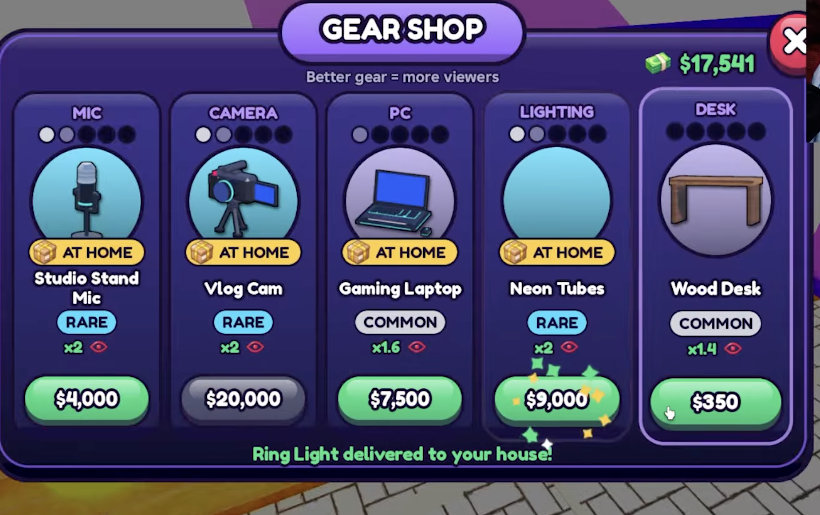
Look at the five slot cards and the five progress dots inside the shop interface to verify the item, price, and multiplier before buying. These listed tiers reflect a third-party recording (video xMU5c1zqy28 recorded at 02:50) at that specific stage, confirming slot layouts while leaving higher unbought levels not recorded.
The buying order that follows from those numbers
Sorting upgrades by cost per +0.1x multiplier produces a clear purchase sequence. Starter pieces that cost under $400 let you establish multipliers in multiple slots early, while mid-game upgrades vary widely in value. The lighting and camera lines offer the lowest theoretical rates on unconfirmed third-party notes, but the microphone line gives the cheapest verified step. The computer line demands the highest rate. You can test custom budget splits on the Calculator.
| Order | Buy | Price | What it changes | Cost per +0.1x |
|---|---|---|---|---|
| 1 | LIGHTING Ring Light | $600 | x1.4 to x1.6 | $300 |
| 2 | CAMERA HD Webcam | $1,500 | x1.4 to x1.6 | $750 |
| 3 | MIC Studio Stand Mic | $4,000 | x1.6 to x2.0 | $1,000 |
| 4 | DESK Gaming Desk | $3,500 | x1.4 to x1.6 | $1,750 |
| 5 | LIGHTING Neon Tubes | $9,000 | x1.6 to x2.0 | $2,250 |
| 6 | PC Gaming Laptop | $7,500 | x1.4 to x1.6 | $3,750 |
| 7 | CAMERA Vlog Cam | $20,000 | x1.6 to x2.0 | $5,000 |
Buy the cheapest entry multiplier first
Pick up the Desk Lamp for $75 the moment you leave your starter shack. It gives an immediate x1.4 multiplier on your lighting line for less cash than a single mini game payout. Once cash passes $150, purchase the Clip Webcam at $150, followed by the USB Desk Mic at $300 and the Wood Desk at $350. These four early purchases establish active multipliers in four separate slots before you attempt any high-tier saving. To find additional early viewer boosts without spending cash, read How to get more viewers.
Push each slot one recorded step at a time
Check your bank balance against the cost per multiplier ranking before buying mid-tier items. Advance the microphone slot first by saving $4,000 for the Studio Stand Mic. This purchase moves the slot from x1.6 to x2.0 and gives the cheapest rate per +0.1x among items confirmed by in-game screenshot or video. After locking in your microphone, build your cash pool to $9,000 for Neon Tubes to complete the lighting line. Check Money and income to align your property earnings with these multi-thousand dollar goals.
Decide between a big step and two small ones
Compare the total cost and multiplier gains when choosing between a large upgrade and several small intermediate steps. The Studio Stand Mic costs $4,000 and grants a +0.4x jump from the x1.6 level. In contrast, buying two separate small steps, such as the HD Webcam at $1,500 and the Gaming Desk at $3,500, costs $5,000 in total while providing two +0.2x increments across different slots. Saving directly for the Studio Stand Mic costs $1,000 less while delivering the same total multiplier gain on verified evidence. If you want permanent multipliers that run alongside equipment, see Passes.
What not to buy
Avoid spending money on inefficient paths while your cash remains limited:
- Saving for the Vlog Cam at $20,000 before filling other slots. Hoarding cash for this camera stalls early stream growth while multiple sub-$5,000 upgrades sit unbought.
- Prioritizing the PC line over other slots. The Gaming Laptop costs $7,500 for a step from x1.4 to x1.6, which comes out to $3,750 per +0.1x boost, making it the most expensive rate in the table.
- Treating the Ring Light and HD Webcam as verified values. They offer the lowest cost per +0.1x boost on paper, but both come from a single third-party guide on 20 November 2026, and the game updated on 22 November 2026 without a recorded price re-check.
- Treating the Gaming Desk as a verified purchase. Its $3,500 price tag also rests on that single third-party guide from 20 November 2026 without in-game screenshot or video confirmation.
You cannot work out what your total multiplier is
The game interface does not state whether multipliers across the five slots add together or multiply each other. No recorded test confirms the full formula across all five slots combined. Because total stacking remains unrecorded, evaluate each purchase by its standalone slot increase rather than calculating an assumed overall account multiplier.